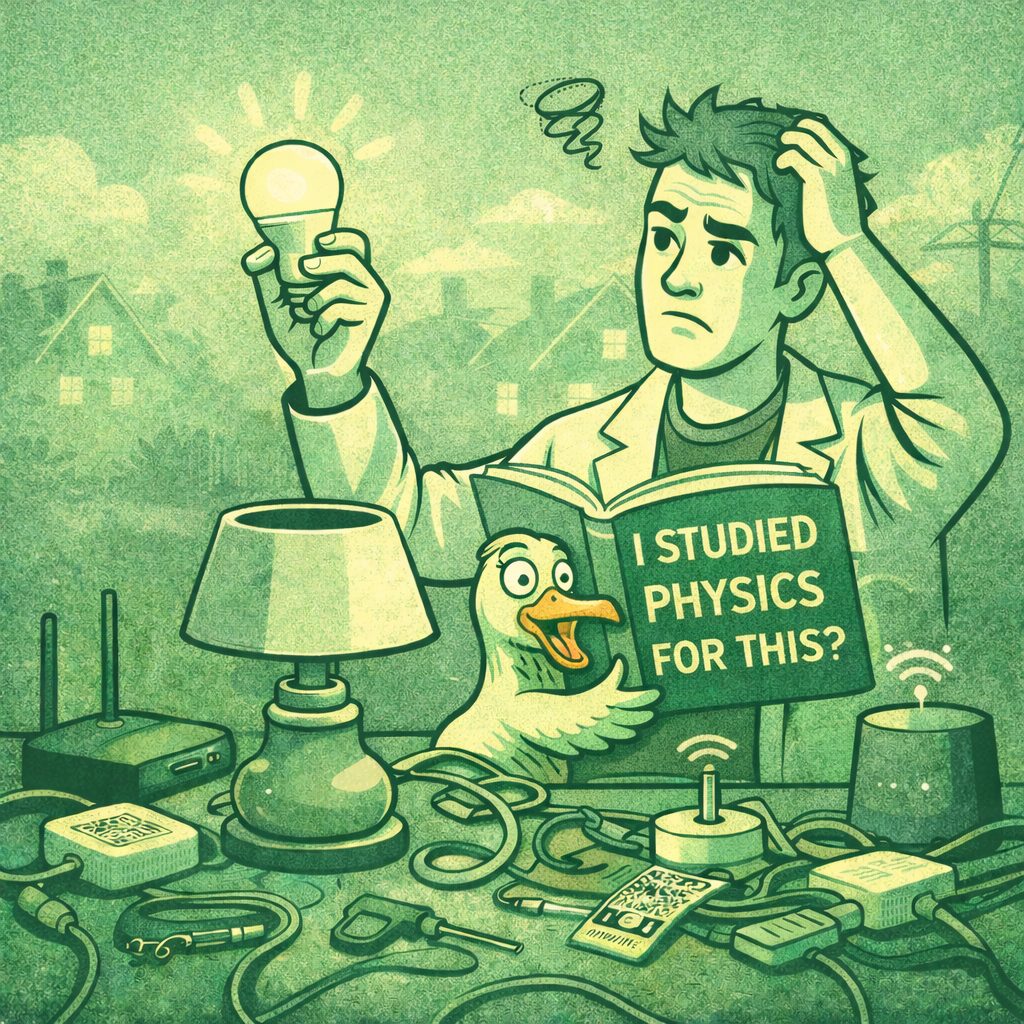
How many physicists does it take to screw in a light bulb?

I’m perpetually torn between embracing new technology and keeping it simple. Being a technologist, the former usually wins. Nowhere has that inner conflict been more punishing than my recent attempt to install “smart” lightbulbs. Ted Kaczynski would like to have a word.

The pitch is great: control the lights on/off, dim them, shift color temperature, and do it all with Siri. Being who I am, I like standards, so I bought bulbs that speak Matter over Thread, a newfangled protocol stack that runs in parallel to WiFi. Thread is the wireless mesh. Matter is the language the devices speak to a controller, which Apple has decidedly branded “HomeKit.” Seriously, who names these things? We’re installing lightbulbs, remember.

It’s supposed to be dead simple. Open the Apple Home app, scan the QR code, watch the bulb connect. But that would be too simple. The dialog sat on “Connecting…” for two minutes before cheerfully announcing “Unable to Add Accessory.” So I tried again. And again. Same result. I flipped the lamp switch. I enabled IPv6 on my router. I power cycled the Apple TV, which doubles as my Thread Border Router. Eureka. It finally paired. (Shopping tally: 3 bulbs.)

I added the two remaining Nanoleaf bulbs, set up a warm evening scene, and basked in my smart-home triumph. Then I turned on the TV to test Apple TV as a controller. Flicker. Flicker. Twenty seconds later, exactly one of the three bulbs changed color. It’s supposed to be instant and control all of them. Something was broken.

I consulted the web and the oracles themselves, Dr. Claude and Dr. ChatGPT. I was not alone. Thread’s reputation for instability precedes it. Power cycling the Apple TV would temporarily fix things, but the system always decayed. An hour later, a day later, accessories started dropping off like flies. My physics degree was not preparing me for this. Years of mechanics, E&M, and thermodynamics classes and I was now googling whether my neighbor’s microwave could take down my lightbulbs.

So I went on a shopping spree. Maybe the Nanoleafs were junk, so I bought a set of Aqara T2 bulbs. (Tally: 6 bulbs.) Maybe my Amplifi WiFi was the issue, so I bought a Unifi Express. (Tally: 6 bulbs, 2 WiFis.) Still flaky, so I bought an Eero. (Tally: 6 bulbs, 3 WiFis.) I toggled every arcane networking setting I could find on the Unifi. I bought an Aqara smart hub to try the bulbs over Zigbee, an older mesh standard. Zigbee. I cannot stress enough how stupid that name is.

Zigbee was more stable, but didn’t play nicely with HomeKit’s adaptive lighting, which gradually shifts the bulbs from cool morning white to warm evening amber. I was a week deep at this point. Apple and every other big tech player has endorsed Thread. There had to be a way to make it work.

My next theory was RF interference. Maybe a neighbor’s WiFi was stepping on my mesh. I changed channels (Channel 11 is a known Thread offender). I cycled my heating fan in case the motor was leaking signal. Nothing.

Then, on a whim, I killed the soundbar and wireless subwoofer. Every bulb reconnected. Every scene worked. Hallelujah.

The culprit: the 2.4GHz link between my soundbar and subwoofer was shouting loud enough to drown the entire Thread mesh. And the reason I’d never caught it? My so-called “Apple TV power cycles” were really flips of the power strip that feeds the TV, soundbar, and subwoofer. The subwoofer stayed off until the TV came back on, long enough to make me think the reboot had fixed things. The Apple TV remote doesn’t fully kill the sound system, but the TV’s original remote does. So the solution, after two weeks of muttered profanity, was to just turn the sound system off when I’m done watching TV. Dr. Claude and Dr. ChatGPT never did diagnose that one.

Subwoofer exiled, the Thread network has been rock solid. I’ve since added a Thread soil sensor for the indoor garden, a HomePod mini I grabbed off Facebook Marketplace (which extends the mesh and acts as a second border router), and a Raspberry Pi running HomeAssistant to pull my thermostat and door lock into HomeKit. Nothing says “the future” quite like needing three committee-named standards and silencing a rogue subwoofer to turn on a lamp. Ted would be proud.

The Nanoleafs went back (Aqaras are better). So did the Aqara hub (HomePod and Apple TV handle it) and the Eero. The Unifi Express 7 stayed. It warmed my inner networking engineer’s heart.

So, final answer: it takes precisely 11 days, 3 WiFis, 3 smart hubs, 2 sets of smart bulbs, and a physics degree to screw in a light bulb.


RIP Evernote, onto Apple Notes

I was an Evernote evangelist for 15 years and I was a paying user for 10 years. Evernote was ahead of it’s time. It was a notes app, freeform database, and web archive tool. It even had optical character recognition 15 years before any other mainstream app, meaning you could search the text within an attached image.

I used Evernote to archive web pages, recipes, birthday gifts, receipts, random songs on the radio—before cell coverage and Shazam were reliable. Even some goofy article my high school gym teacher wrote for the Manchester Hippo made it into my Evernote file.

The app was also system agnostic. It worked on Mac, Windows, Android, iOS, and the web. The Evernote clipper plugin even worked on Linux. I was an Android user for my first 6 years of being a smartphone user. I used Ubuntu Linux for over 5 years as my daily driver operating system at work. Being system agnostic was something appealing to me—and still is.

When I got my first job after college, I decided to upgrade to the paid version of Evernote, which was roughly $30/year at the time. The yearly rate slowly increased, but somehow I managed to remain grandfathered-in to a modest pricing plan. Evernote got reorganized multiple times, and more recently got bought out by Bending Spoons, a European conglomerate. The kicker is that they were going to force me onto a $130/year plan. Forget it.

I’ve been slowly drinking more and more of the Apple koolaid. Truth be told, I’ve been using Macintoshes since I was 2 years old. When I was 6, in 1999, my parents got me one of the original G3 iMacs. Mine was green ☺️ That computer also will go down in history as one of the best pieces of industrial design ever.

Enter Apple Notes. It was one of the first iOS apps in 2008, but it was quite crude, despite the kitschy skeuomorphism façade. The font was MarkerFelt if I remember correctly and the background looked like a yellow legal pad. I never really considered it a serious note taking app until more recently.

Fortunately over the years Apple has added nearly all of my beloved features of Evernote. Optical character recognition, tags for notes, folders, device syncing (only among Apple devices), a web app, etc. I’ll add that the tagging feature in Apple Notes is better than Evernote: anywhere within the note, you can just use # symbols just like a tweet. Apple Notes also works much faster than Evernote, which was starting to get pretty slow in the new versions. Only notable omission is that Apple Notes does not have a web page clipping feature. This was nice in Evernote, because often webpages change or eventually get removed. Oh well. That feature wasn’t worth $130 for me.

I used this fantastic utility on GitHub called evernote-backup to archive all my notes in Evernote, which really are just rows in a SQLite database. The Evernote archive files can be imported directly into Apple Notes. After that I was off to the races. Vivat Apple Notes.

How I browse the internet

Richard Stallman

Richard Stallman is an eclectic character in the software community to say the least. He founded the GNU Project, which lead to the development of the Linux kernel ultimately by Linus Torvalds in 1991. Torvalds is (quietly) a more significant figure in the history of computing, whereas Stallman is a colorful hippy. For those who don’t know, Linux operating systems power the vast majority of the internet and most back-end servers. The Android mobile operating system is a Linux distribution and iOS/MacOS is also Unix-based, which is a closely related predecessor to Linux.

Honestly, the most intriguing thing to me about Richard Stallman is not his contributions to computing nor his wacky political views but rather his website. Stallman is a prolific writer on his website, which looks like its formatting remains largely unchanged since the mid-1990s. To some degree, Stallman’s website inspired my own. At stallman.org, you can learn about everything from his views on gender neutrality in Spanish, to self-authored French poetry, to his love life. He even posts his former romantic personals listing. Oh la la.

Within the website there are a lot of gems but the page that I find funniest is where he describes how he painstakingly uses the internet.

I generally do not connect to web sites from my own machine, aside from a few sites I have some special relationship with. I usually fetch web pages from other sites by sending mail to a program that fetches them, much like wget, and then mails them back to me. 

If you are a techy, the page will give you a good laugh. Stallman is against just about every useful mainstream website and piece of software nearly to the point of nearly being a luddite because many of these advancements are proprietary. I should not deride Stallman too much because I also am a big believer in free software, privacy, and largely abolishing intellectual property rights.

And now I too will describe how I browse the internet. For starters, I mainly use the Brave web browser, which is a privacy friendly, de-Googled version of Chrome. There are a number of websites that I find myself needing to use Safari for because Brave does too good of a job blocking active (tracking) elements in webpages. On my iPhone, I mainly use Safari out of convenience. DuckDuckGo is my primary search engine, but I occasionally run Google searches. DuckDuckGo conveniently has short codes for accessing other search engines within its own search box (e.g.: “!g” for Google, “!yt” for YouTube, or “!a” for Amazon”). This is particularly useful if you set your default search engine in your browser to DuckDuckGo. More recently, I’ve started to use a VPN, which can shield you from your internet service provider from tracking you. Not as useful against a state actor. For encrypted messaging, I’ve become a big fan of Signal, which I use on a daily basis with many friends. Despite privacy becoming harder to maintain, there is at least growing cognizance about the benefits of privacy.

Showing scale of the universe with Metric A4 paper

Most of the world uses paper called A4, which is slightly narrower and longer than US/Canadian letter paper. The A-series paper has a neat property, because of its dimensions, that if you fold it in half, it will still have the same aspect ratio. So A5 is half of A4, which is half of A3 and so forth. A0 is one square meter in area.

This video I found makes my inner physicist chuckle because it shows the scale of the universe relative to A4 paper. Reminds me of Formi questions for Science Olympiad. It also reminds me of an often cited book in computer science called “A pattern language”, written by an architect named Christopher Alexander, which explores how everything in the universe is repeated patterns that scale.

A picture is worth a thousand words

I’ve had a webcam continuously mounted to the roof of my family’s cottage on Lake Sunapee since 2014, mainly with the purpose of spying on the weather when away from the lake. Our view of Sunapee Harbor is one of the best views on the lake. Unfortunately, from the angle of the webcam, you can’t see Mt Sunapee, which is located directly behind the tall tree on the right.

I wrote a program for a Raspberry Pi micro computer that sits inside the cottage which uploads photos from the camera to a website, which also gets forwarded to other weather websites such as Windy and, formerly, Weather Underground. Windy even generates 24-hour time-lapses.

Additionally, within the last couple years, I wrote another program that tweets the sunset and sunrise webcam photos on the @SunapeeWX Twitter feed. Slowly, I’ve made improvements to the feed, including embedding a temperature forecast API. Soon, I hope to integrate a sunset/sunrise forecast API, SunsetWX, which is also available via the Alpenglow iPhone app.

Keeping a remote webcam online over the years has proved to be a challenge, particularly with intermittent power and internet. This is the second webcam I’ve had on the roof and this spring I’ll probably upgrade and get a newer one. The sensor is starting to fail, thus why it frequently shows blank or pixelated images. The Chinese firmware in this Amcrest camera is also particularly bad. The reviews on newer Reolink cameras look more promising.

I’ve also experimented with personal weather stations on the roof over the years, but those have proven to be finicky as well, so I’ve chosen to focus on the webcam instead. The webcam has been extremely useful for anticipating both aviation and ski conditions. A picture is worth a thousand words!

Blog SEO and Keene travel guide

Oh the art of search engine optimization! It’s taking me well over two months to get listed on Bing, which will also get me cross listed on DuckDuckGo, one of my favorite search engines for privacy purposes. It would be nice for people to find this website in more places than just Google.

I wonder how useful this site will be for people in the future. Ironically, one of my coworkers asked me recently for travel recommendations for Keene, NH. I used a lot of the same info that I used in my post about Walpole.

Other highlights about the Keene area:

Windy weather

“All models are wrong, but some are useful,” according to the famous statistician George Box. The same can be said about weather models. Believe it or not, there is more than one forecast model. Most sites and apps in the US use the North American Model (NAM), which many meteorologists and weather observers question its accuracy.

I think the best solution is to have access to more weather models, which is why Windy is my go-to weather website and mobile app. Windy currently supports five weather forecast models, and even allows the users to compare all models on one timeline view for any given location.

I was introduced to Windy by a coworker several years ago, and I’ve been impressed so much that I currently subscribe as a premium customer. It was developed in Javascript by a helicopter pilot to initially help show wind information. The website and app are constantly getting new updates and new layers for the map. I find the rain & thunder, cloud cover, Infra+ satellite, temperature, and wind layers to be most interesting. Personal weather web cams can be submitted to the site, as I’ve done for my Sunapee Harbor Webcam. Highly recommend windy.

Interactive population graphic

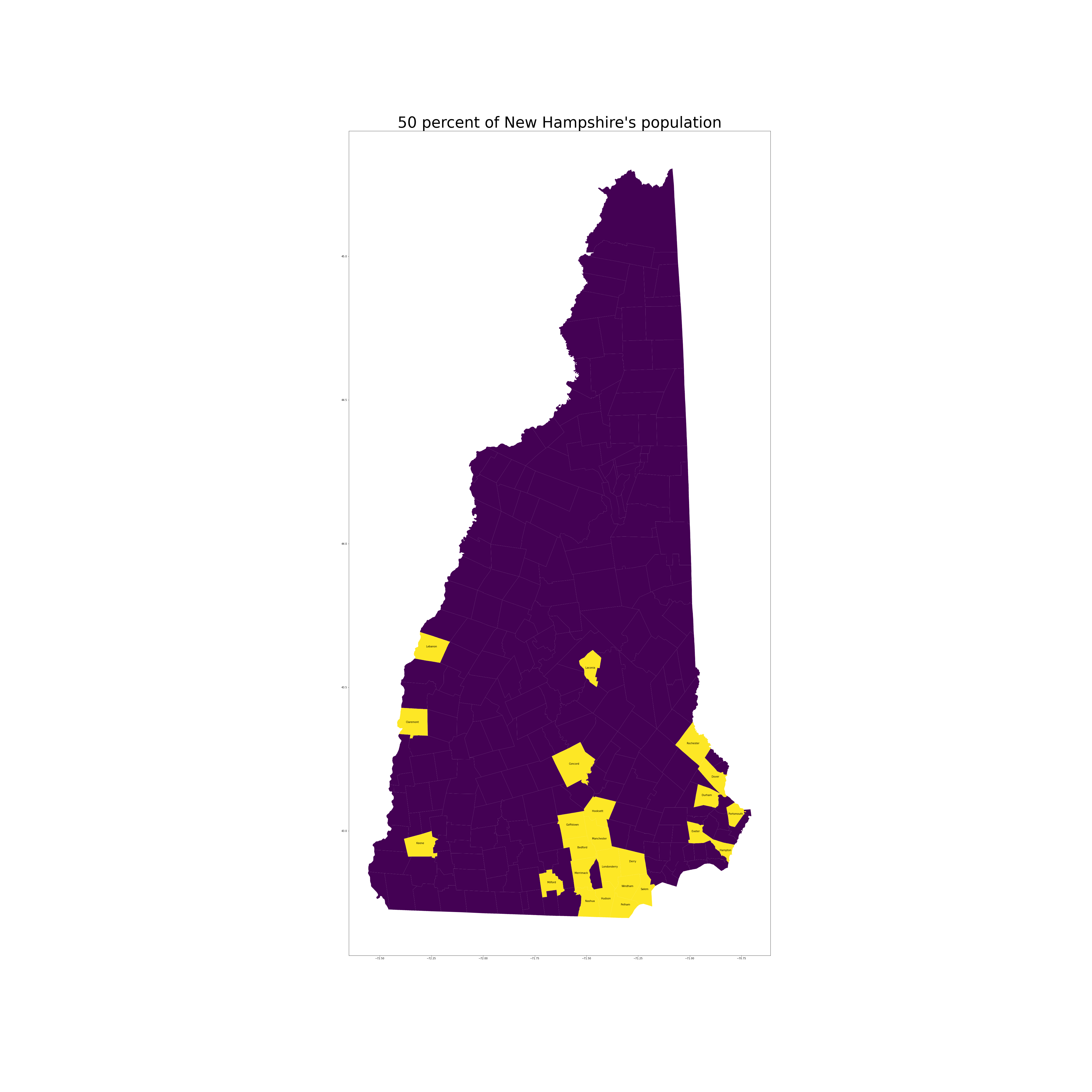
Half of New Hampshire’s population lives in the yellow zone, and the other half lives in the purple area

Click here to view the interactive version of the graphic!

I could stare at maps for hours. I don’t think there is anything more elegant that conveys more information than a map. I’ve long had a fascination for geography and cartography.

This was originally inspired by Reddit’s r/peopleliveincities, which contains maps intended to show certain statistics, but in reality just show that those stats are associated with high population densities.

On a technical note, I used a very cool Python library called Streamlit to make the map interactive and host the widget. It’s amazing to me that in 2021 it’s possible to make a simple web app with less than 50 lines of code. This widget and graphic also heavily leverages a shapefile generated by NHGRANIT, New Hampshire’s GIS clearinghouse. In theory, maps like this could be generated with any state, but most states only publish data on a county-level. Kudos to NHGRANIT for publishing a shapefile that works well out of the box with Geopandas.